




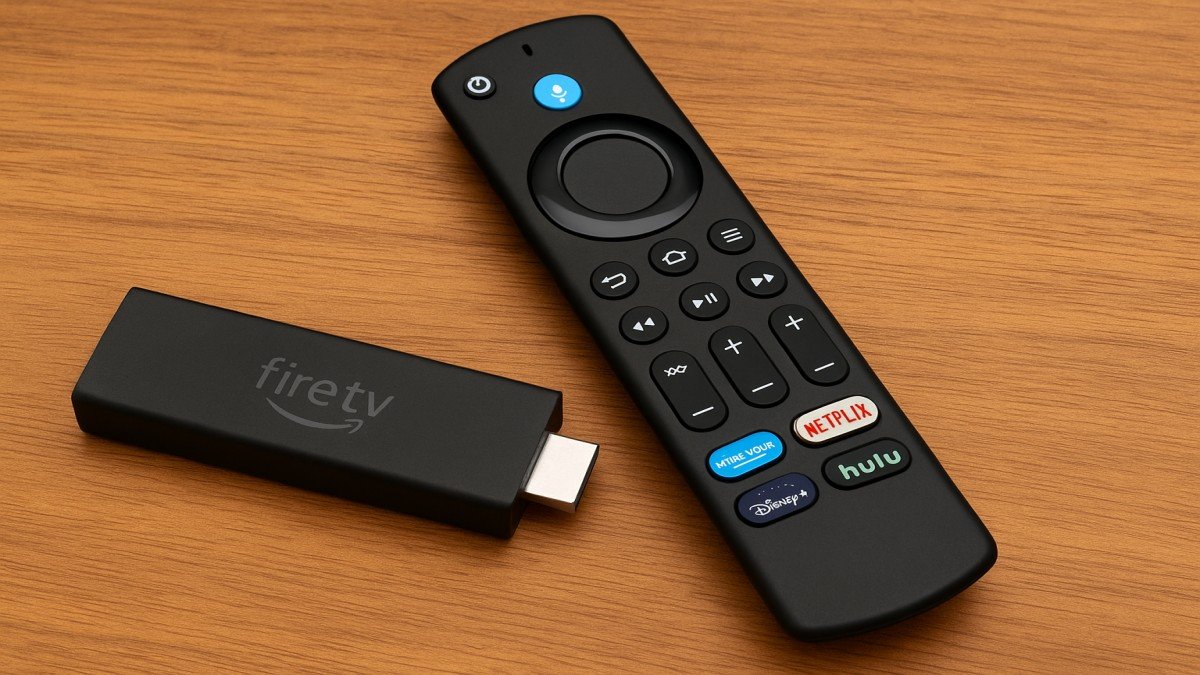
The Amazon Fire TV Stick has become one of the most popular streaming devices worldwide and for good reason. Whether you want to cut the cord, upgrade your TV viewing, or simply enjoy entertainment from anywhere, the Fire TV Stick makes it easy, affordable, and incredibly convenient. Let’s explore everything you need to know.
What Is a Fire TV Stick?
A Fire TV Stick is a small, plug-and-play streaming device that connects to your TV’s HDMI port. It transforms your regular television into a smart TV, giving you access to apps like Netflix, Prime Video, YouTube, and thousands more.
Think of it like giving your TV a powerful brain upgrade, without replacing the whole device.
Why Is the Fire TV Stick So Popular?
Its biggest strengths?
- It’s affordable
- It’s fast
- It supports 4K (depending on the model)
- It works with Alexa voice commands
- It’s incredibly easy to set up
Whether you’re tech-savvy or not, the Fire TV Stick makes entertainment simple.
Different Versions of the Fire TV Stick
Amazon offers several variants, each targeting different needs.
Fire TV Stick Lite
Perfect for:
- Budget users
- Basic HD streaming
Does not include TV controls on the remote.
Fire TV Stick (Standard Edition)
A solid option featuring:
- Full HD streaming
- Alexa Voice Remote with TV controls
Great balance of performance and price.
Fire TV Stick 4K
Best for:
- 4K TVs
- HDR streaming
- Dolby Atmos audio
A great mid-range pick.
Fire TV Stick 4K Max
Amazon’s most powerful stick, offering:
- Faster processor
- Better Wi-Fi
- Improved graphics for casual gaming
Ideal for power users.
How Does Fire TV Cube Compare?
Fire TV Cube is more expensive but offers:
- Hands-free voice control
- Faster performance
- Built-in speaker
More like a mini smart-home hub.
Key Features of the Fire TV Stick
Compact and Portable
The Fire TV Stick is small enough to fit in your pocket perfect for travel, hotel stays, or switching between rooms.
Alexa Voice Remote
Press a button and simply say:
- “Play Stranger Things.”
- “Open YouTube.”
- “Set volume to 15.”
Hands-free entertainment at its best.
Thousands of Streaming Apps
Popular apps include:
- Netflix
- Disney+
- Hulu
- Prime Video
- HBO Max
- Spotify
You’ll never run out of options.
Parental Controls
Protect your kids with:
- App restrictions
- PIN protection
- Content filtering
4K, HDR, and Dolby Atmos Support
If you have a modern TV, the Fire TV Stick 4K and 4K Max deliver incredible picture and sound quality.
Setting Up the Fire TV Stick
What You Need Before Starting
- An HDMI TV
- Wi-Fi connection
- Amazon account
- Power outlet
Step-by-Step Setup
- Plug the Fire Stick into your TV’s HDMI port
- Connect the USB power cable
- Turn on the TV and select the HDMI input
- Pair the remote
- Connect to Wi-Fi
- Log in with your Amazon account
Simple and quick!
Pairing the Remote
The device automatically detects the remote press the Home button to connect manually if needed.
Best Apps to Use on Fire TV Stick
Streaming Apps
- Netflix
- Amazon Prime Video
- Hulu
- Disney+
- YouTube
- Apple TV
Entertainment Apps
- Spotify
- TuneIn
- Twitch
Utility Apps
- VPN apps
- File management tools
- Downloader app
Downloader allows you to install third-party apps easily.
Fire TV Stick Tips and Tricks
Speeding Up Slow Performance
Try:
- Clearing app cache
- Uninstalling unused apps
- Restarting the device
Expanding Storage
Use an OTG cable to connect:
- USB drive
- External storage
Using Voice Commands
Alexa works flawlessly:
- “Play music”
- “Fast forward 30 seconds”
- “Open Netflix”
Screen Mirroring
Mirror your phone or tablet:
- Android devices easily
- iPhone with third-party apps
Fire TV Stick for Gaming
Cloud Gaming Support
Play games using:
- Amazon Luna
- NVIDIA GeForce NOW
Perfect for casual gaming without a console.
Bluetooth Controller Support
Connect:
- Xbox controllers
- PlayStation controllers
- Third-party gamepads
Pros and Cons of Fire TV Stick
Advantages
- Affordable
- Fast performance
- Huge app selection
- Voice control
- Portable
Limitations
- Needs strong Wi-Fi
- Limited storage
- Occasional ads on the home screen
Conclusion
The Amazon Fire TV Stick is a versatile, powerful, and affordable way to upgrade your TV entertainment experience. Whether you want to stream movies, enjoy music, play casual games, or use voice commands, the Fire TV Stick covers it all. With multiple versions available, you can easily choose one that fits your needs and budget.
FAQs
1. Does the Fire TV Stick require a monthly subscription?
No — only pay for the apps you choose (like Netflix).
2. Can I use the Fire TV Stick on any TV?
Yes, as long as the TV has an HDMI port.
3. Do I need an Amazon Prime membership?
No, but Prime Video content requires a subscription.
4. Can I travel with my Fire TV Stick?
Absolutely — just plug it into any compatible TV and connect to Wi-Fi.
5. Can I browse the internet on the Fire TV Stick?
Yes, using browsers like Silk Browser or Firefox (if available).